Disclosure: This page contains affiliate links. If you sign up through our links, we earn a small commission at no extra cost to you. We only recommend tools we use and trust.
This post contains affiliate links. If you sign up through our links, we earn a small commission at no extra cost to you. We only recommend tools we use and trust.
This guide covers the essential automation tools coaches need in 2026. The right stack—Make.com, Kit, and SavvyCal—saves 10+ hours weekly by automating client onboarding, email sequences, and scheduling. Start with these three before adding complexity.
Choosing the right automation tools for your coaching business is one of the most important decisions you will make. The wrong tools waste hours in setup and break down when you need them most. The right tools run quietly in the background and save you 10+ hours every week.
This guide covers every major automation tool relevant to coaching businesses in 2026. Each tool is evaluated on setup difficulty, pricing, what it actually does well, and whether it fits solo coaches, group programs, or larger coaching operations.
Start with the Core Stack section. These are the 3-4 tools that handle 80% of coaching automation needs. The specialist tools in later sections are for coaches with specific needs — WhatsApp clients, AI content workflows, or advanced email segmentation.
Free: 25-Point Coaching Automation Checklist
Download the complete checklist covering every automation a coaching business should have. Includes tool recommendations for each workflow.
Download Free Checklist → →The Core Automation Stack for Coaches
Most coaching businesses can automate 80% of their admin work with just three or four tools. This is the combination that works for the widest range of coaching niches and business sizes.
Make.com — Workflow Automation Engine
Make.com is the tool that connects everything else. It watches for triggers — a new booking, a form submission, a payment — and then runs a sequence of actions across your other tools. Think of it as the brain of your automation stack.
- What it does: Connects 1,000+ apps, runs multi-step automated workflows, handles logic and conditions
- Best for: Client onboarding, session reminders, payment follow-ups, data routing between tools
- Free plan: 1,000 operations per month — enough to start with 2-3 basic workflows
- Paid plans: From $9/month (Core, 10,000 ops) to $29/month (Pro, 150,000 ops)
- Skill level: Beginner — visual drag-and-drop, no code required
- vs Zapier: More powerful, more affordable, steeper initial learning curve but better long-term
This is the single most important tool in the coaching automation stack. If you only use one automation tool, make it Make.com. The free plan handles basic workflows. Upgrade to Core ($9/month) when your operation volume grows.
Kit (ConvertKit) — Email Marketing and Automation
Kit is the email automation platform most trusted by coaches, consultants, and course creators. It handles your email list, sends automated sequences, and tags subscribers based on their behaviour so the right email reaches the right person at the right time.
- What it does: Email list management, automated sequences, broadcast emails, subscriber tagging and segmentation
- Best for: Lead nurture sequences, client onboarding emails, weekly newsletters, re-engagement campaigns
- Free plan: Up to 10,000 subscribers with basic automation
- Paid plans: Creator from $25/month (advanced automations), Creator Pro from $50/month (referral systems, priority support)
- Skill level: Beginner — clean, intuitive interface
- vs GetResponse/ActiveCampaign: Simpler, creator-focused, better deliverability for smaller lists
Choose Kit if you are a solo coach or small team who needs reliable email automation without complexity. Choose GetResponse if you run webinars (it has built-in webinar tools) or need advanced sales funnel features. Most coaches start with Kit and never need to switch.
SavvyCal — Scheduling Automation
SavvyCal eliminates the back-and-forth booking emails that waste 30-60 minutes per week for most coaches. Clients book directly in your calendar, SavvyCal handles timezone conversion automatically, and it integrates with Make.com to trigger your onboarding workflow the moment a session is booked.
- What it does: Client-facing booking pages, calendar sync, timezone automation, team scheduling
- Best for: Discovery calls, coaching sessions, consultations, group bookings
- Pricing: $12/month (Scheduling) or $20/month (with team features)
- Skill level: Very easy — set up in under 30 minutes
- vs Calendly: SavvyCal has an affiliate program; Calendly does not. Feature parity at lower price.
The $12/month cost pays for itself if you save just 5 minutes per booking per week. Most coaches book 5-15 sessions per week. SavvyCal is a non-negotiable part of a professional coaching automation stack.
Build Your Automation Stack with Make.com
Make.com connects Kit, SavvyCal, and all your other coaching tools into a single automated system. Free plan available. No coding required.
Start Make.com Free → →Email Marketing Tools: Full Comparison
Email is the highest-ROI marketing channel for coaching businesses. Automated email sequences run 24/7, nurture leads through long decision cycles, and keep current clients engaged between sessions. Here is how the major platforms compare.
Kit (ConvertKit) — Best for Solo Coaches
Kit was built specifically for creators and consultants, which makes it the most natural fit for coaches. The automation workflow builder is visual and intuitive. The email editor is clean and focused on text-first emails — which consistently outperform heavily designed newsletters in coaching niches.
- Standout feature: Tagging system that lets you segment subscribers based on interests and behaviours
- Standout feature: Visual automation builder — build sequences with if/then logic visually
- Weakness: Limited design templates compared to GetResponse
- Best plan to start: Free (up to 10k subscribers), upgrade to Creator when you need advanced automations
GetResponse — Best for Webinars and Funnels
GetResponse is the all-in-one choice. It includes email marketing, landing pages, webinar hosting, and a website builder in one platform. For coaches who run regular webinars as part of their lead generation, GetResponse eliminates the need for a separate webinar tool.
- Standout feature: Built-in webinar platform (up to 1,000 attendees on higher plans)
- Standout feature: AI email content generator and subject line testing
- Weakness: Interface is more complex than Kit — steeper learning curve
- Best plan to start: Email Marketing ($19/month for up to 1,000 contacts)
ActiveCampaign — Best for Advanced CRM Needs
ActiveCampaign is the most powerful option for coaches who need detailed CRM functionality alongside email marketing. It tracks every interaction a contact has had, scores leads automatically, and enables highly personalised automation based on contact behaviour.
- Standout feature: Built-in CRM with pipeline management — tracks deals alongside email
- Standout feature: Predictive sending — AI sends each email at the time each subscriber is most likely to open
- Weakness: Most expensive and most complex — overkill for solo coaches
- Best plan to start: Starter ($15/month) — upgrade to Plus for CRM features
WhatsApp Automation for Coaches
WhatsApp has 2+ billion users and open rates of 90%+ compared to email's average of 20-25%. For coaches whose clients prefer WhatsApp communication — common in many markets outside North America — WhatsApp automation delivers dramatically better engagement than email.
WATI — WhatsApp Business API for Coaches
WATI is the leading WhatsApp Business API platform for small businesses and coaching operations. It connects your WhatsApp Business account to automated workflows, letting you send template messages, reminders, and follow-ups at scale.
- What it does: Automated WhatsApp messages, broadcast campaigns, chatbot responses, CRM integration
- Best for: Session reminders, lead follow-up, client check-ins, re-engagement
- Pricing: From $40/month — includes 1,000 conversations
- Skill level: Moderate — requires WhatsApp Business API account setup (1-2 days)
- Integration: Works with Make.com — trigger WhatsApp messages from any coaching workflow
The WhatsApp Business API requires a Facebook Business account and a brief approval process. Plan for 2-5 business days for setup. WATI guides you through this process, but it is not instant.
AI Content Tools for Coaches
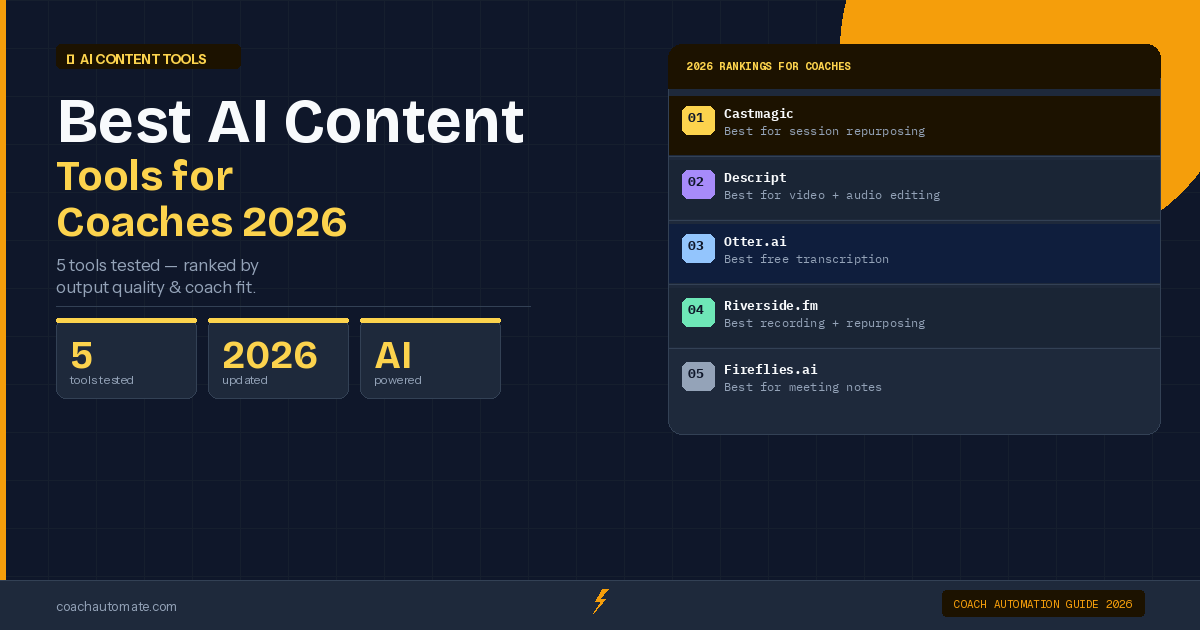
AI tools have made content creation and session documentation dramatically faster for coaches. The best tools in this category handle transcription, summarisation, and content repurposing — turning one coaching session into a week of content.
Castmagic — AI Transcription and Content Repurposing
Castmagic is built specifically for coaches, podcasters, and content creators. It automatically transcribes audio and video recordings and then uses AI to generate summaries, social posts, email newsletters, blog posts, and show notes — all from the same recording.
- What it does: Transcription, AI-generated summaries, social posts, email content, show notes, coaching session notes
- Best for: Coaches who record sessions, create podcast content, or want to repurpose coaching IP into courses
- Pricing: From $39/month
- Skill level: Very easy — upload audio or video, get content back in minutes
- ROI calculation: 1 hour recording → 5-8 pieces of repurposed content → saves 3-5 hours of manual writing
Record every coaching session (with client permission). Upload to Castmagic. Get: session summary for your records, action items for the client, social post ideas, newsletter content. One click turns a coaching session into a week of marketing content.
Tool Combinations by Coaching Business Size
The right tool stack depends on where you are in your coaching business. Here is the recommended combination by stage.
Solo Coach — Starting Out ($12-25/month)
- Make.com free plan — basic automation workflows
- Kit free plan — email list up to 10,000 subscribers
- SavvyCal $12/month — scheduling
This combination handles client onboarding, email nurture, scheduling, and basic reminders. Most solo coaches run on this stack for 12-24 months before needing anything more.
Growing Coaching Business ($60-100/month)
- Make.com Core $9/month — higher operation volume
- Kit Creator $25/month — advanced automations and sequences
- SavvyCal $12/month — scheduling
- WATI $40/month — if WhatsApp is your client's preferred channel
Add WATI when your no-show rate is a problem or when your clients are primarily on WhatsApp. Otherwise, keep the stack lean.
Established Coaching Business ($120-200/month)
- Make.com Pro $29/month — full automation power
- Kit Creator Pro $50/month or GetResponse $49/month — advanced segmentation or webinar capability
- SavvyCal $20/month — team scheduling
- Castmagic $39/month — AI content repurposing
- WATI $40/month — WhatsApp client communication
At this stage, the automation stack is a genuine business asset. It handles client onboarding, nurture, reminders, content production, and payment follow-up — allowing the coach to focus exclusively on delivery and growth.
How to Choose: Decision Framework
If you are unsure which tools to start with, use this framework.
- Do you have a working email list and send emails to clients and leads? If no: start with Kit.
- Do you spend more than 2 hours per week on scheduling and reminders? If yes: add SavvyCal immediately.
- Do you want to automate the connection between your tools? If yes: add Make.com.
- Do your clients primarily communicate via WhatsApp? If yes: add WATI.
- Do you create audio or video content and want to repurpose it? If yes: add Castmagic.
Start with the tools that answer yes to the most urgent question. Add the others as your automation maturity grows.
Use the CoachAutomate ROI Calculator to find out exactly which automation would save you the most time and money based on your specific coaching business setup.
Frequently Asked Questions
Can I use all of these tools together?
Yes. Make.com connects all the tools in this guide — Kit, SavvyCal, WATI, Castmagic, GetResponse, and ActiveCampaign all have Make.com integrations. You can build automation workflows that span multiple tools seamlessly.
Is there a free alternative to SavvyCal?
Calendly has a free plan, but it is limited to one event type and lacks Make.com's deeper integration triggers. For a coaching business that books more than 5-10 sessions per week, the $12/month SavvyCal cost is justified by the time saved and the better client experience.
Do I need to use Make.com if I already use Zapier?
Not necessarily. If your existing Zapier workflows are working, there is no urgent need to switch. Make.com is typically more cost-effective for coaching businesses with moderate-to-high automation volume. If you are starting fresh, Make.com is the better choice in 2026.
Which tool has the best affiliate commission structure for referring other coaches?
Kit offers 50% commission for the first year of referrals. Make.com offers 20-30% recurring commission. Both are strong programs if you want to recommend tools to coaching colleagues.
See All Coaching Automation Workflows
Browse the complete workflow library — step-by-step setup guides for every key coaching automation, from client onboarding to client renewal reminders.
View Workflow Library → →