Disclosure: This post contains affiliate links. If you sign up through our links, we earn a small commission at no extra cost to you. We only recommend tools we use and trust.
This post contains affiliate links. If you sign up through our links, we earn a small commission at no extra cost to you. We only recommend tools we use and trust.
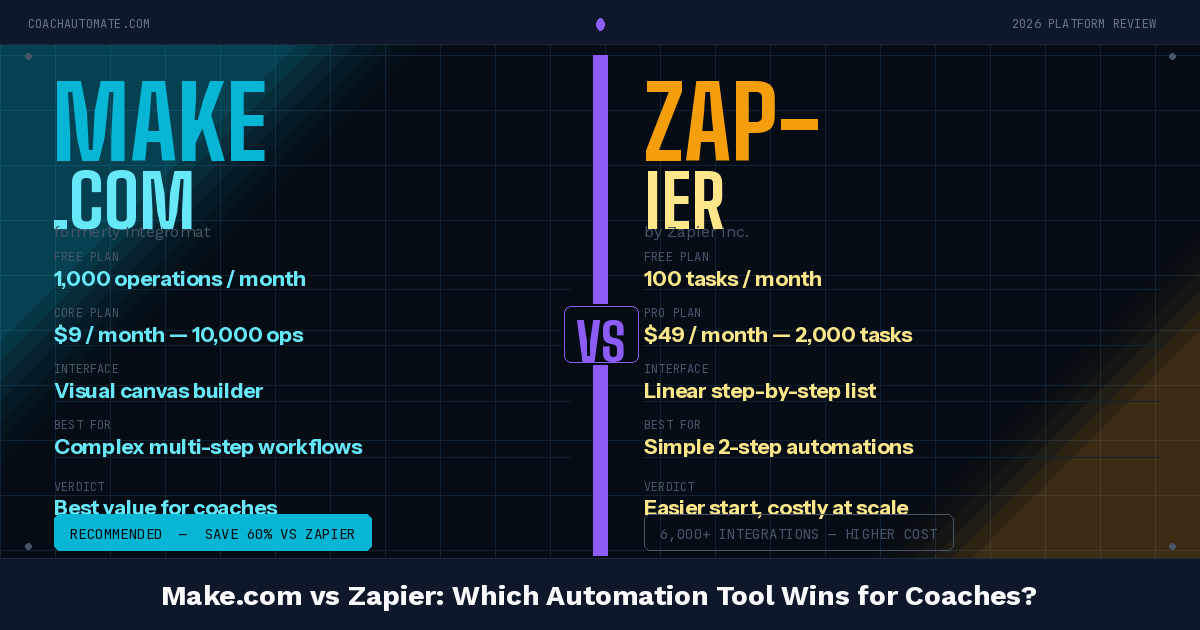
Make.com is the best no-code automation platform for coaches. It connects your scheduling, email, and payment tools without code, letting you automate bookings, onboarding, and follow-ups seamlessly. Trade-off: steeper learning curve than Zapier, but far more powerful and cheaper long-term.
Last reviewed: May 2026 by CoachAutomate Team
Make.com is the automation platform we recommend to every coach who wants to eliminate admin work. After testing it extensively — building booking workflows, onboarding sequences, and payment automations — our verdict is clear: for coaches, Automate workflows with Make.com is the highest-value automation tool available. This review tells you exactly why, and where it falls short.
Related: Complete Guide to Coaching Automation
Related: Coaching Automation Workflows
Related: Best Automation Tools for Coaches
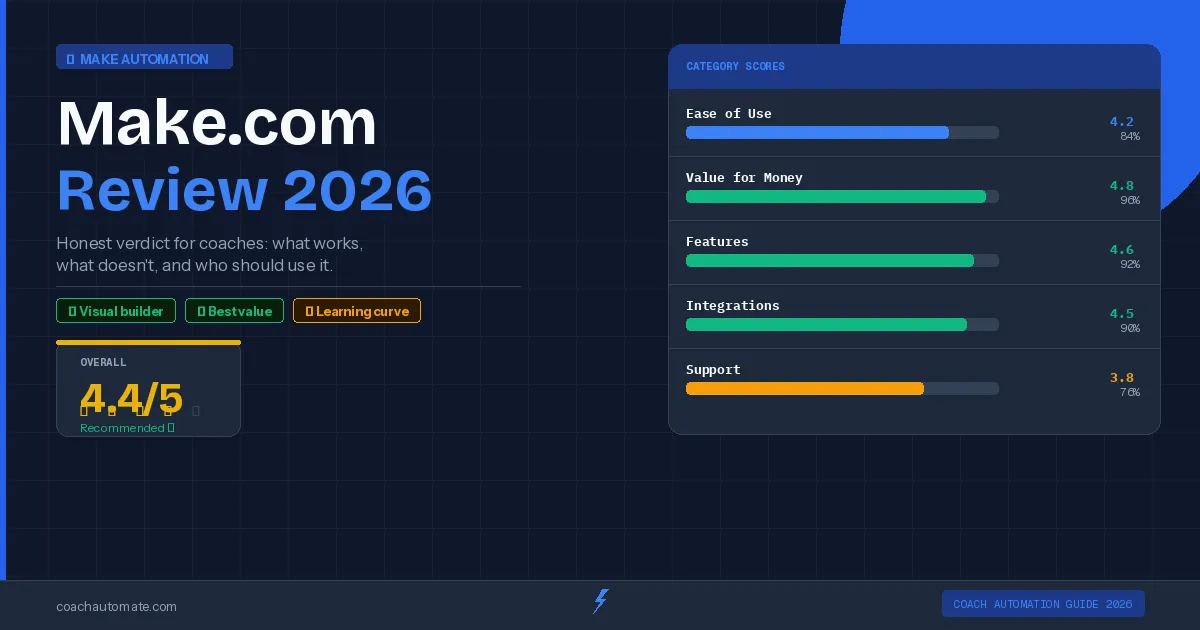
| Category | Score | Notes |
|---|---|---|
| Automation Power | 4.8/5 | Best visual canvas in the market |
| Ease of Use | 4.0/5 | Learning curve but intuitive once learned |
| Pricing / Value | 4.7/5 | Free plan + $9/mo Core beats all competitors |
| Integrations | 4.6/5 | 1,000+ apps including all coach tools |
| Coach-Specific Fit | 4.5/5 | SavvyCal + Kit + Stripe all native |
| Reliability | 4.3/5 | Occasional sync delays, strong uptime |
What Is Make.com?
Make.com (formerly Integromat) is a visual automation platform that connects apps and services without code. You build scenarios on a canvas — each module represents an app action, and you connect them to create workflows. When a trigger fires (a new booking, a form submission, a payment), the scenario runs automatically and executes every action in sequence.
Why Make.com Is Particularly Good for Coaches
Want this in PDF form?
Get the 32-page Coach Automation Playbook — every workflow in this article, plus 5 more, ready to implement this week.
✓ Check your inbox — the playbook is on its way!
No spam. Unsubscribe anytime.
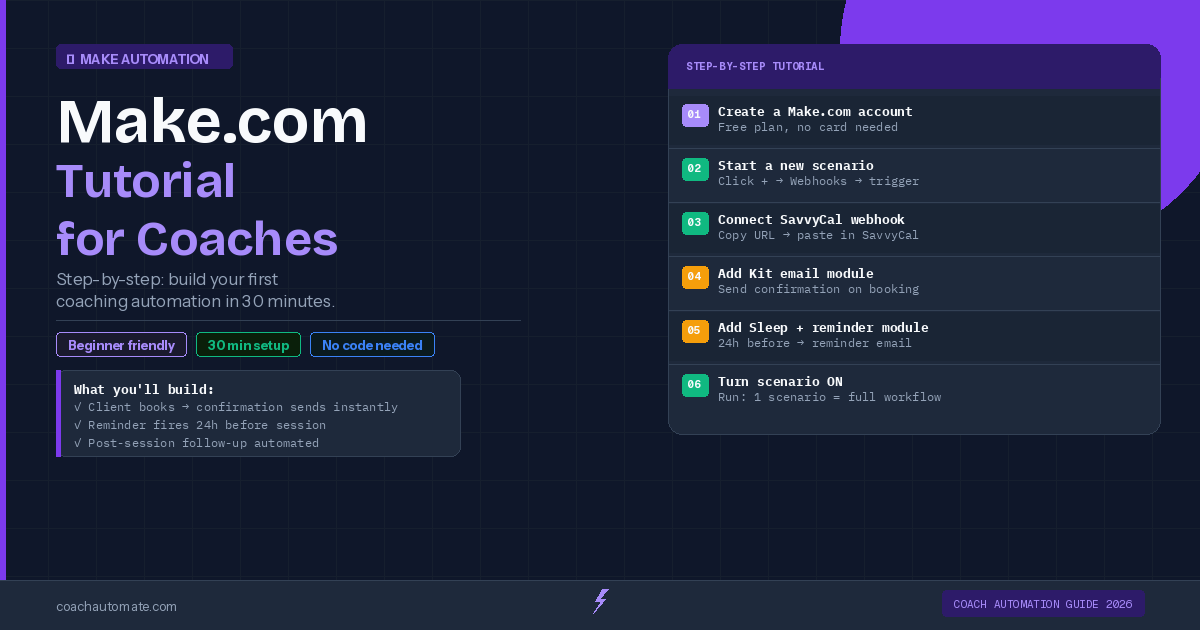
Coaches use a specific set of tools — a scheduling app, an email platform, a payment processor, and a CRM. Automate workflows with Make.com has native integrations with every tool in this stack: SavvyCal, Grow your audience with Kit, Stripe, Notion, Google Sheets, and 1,000 more. This means you can build a complete coaching automation system — bookings triggering emails, payments triggering onboarding, sessions triggering follow-ups — without any custom code or complex setup.
Honest Cons: Where Make.com Falls Short
Make.com's learning curve is real. The first scenario takes longer than Zapier's equivalent. The operation counting system confuses new users. And when a scenario fails, the error messages are not always intuitive. For coaches who want to set up automation in under an hour without any learning investment, Zapier is easier to start with — though significantly more expensive over time.
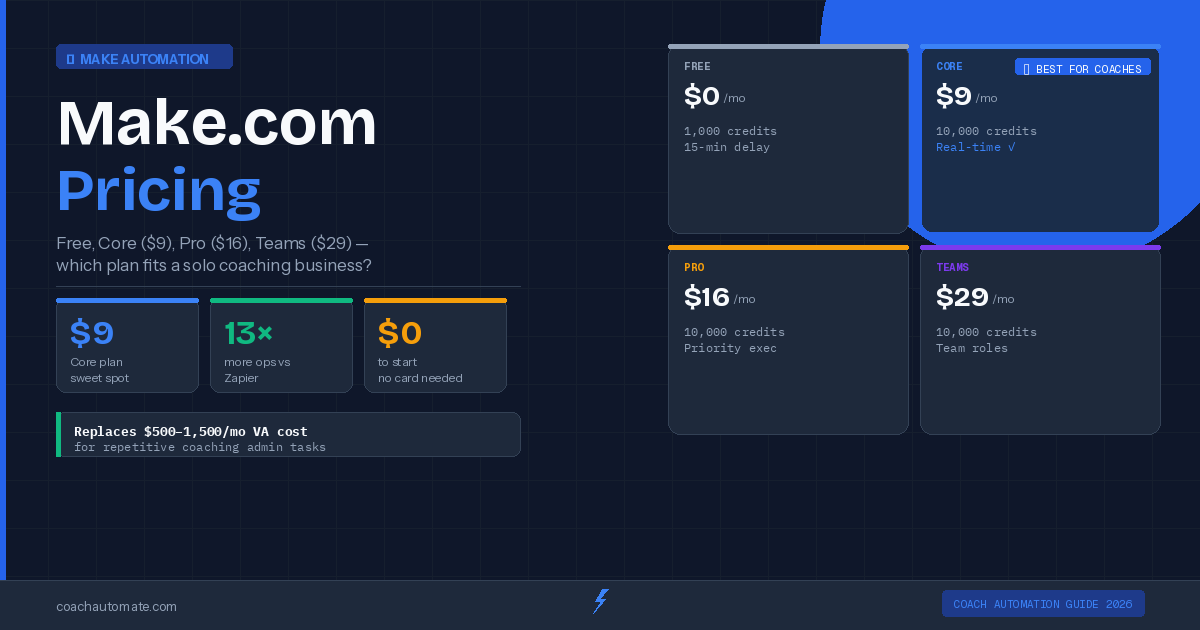
Make.com is the best automation platform for coaches at any budget. The free plan covers basic automation, the $9/month Core plan covers a full coaching practice, and the visual canvas scales to any complexity you need. Sign up free and build your first workflow today.
Start Make.com Free Today
1,000 operations/month free. No credit card required. Build your first coaching automation in under 30 minutes.
Start Make.com Free → →Frequently Asked Questions
Is Make.com a good automation tool for coaches?
Yes — in my testing Make.com is excellent for coaches. It connects scheduling apps (SavvyCal), payment processors (Stripe), CRMs, Notion, Google Sheets and more, so you can automate bookings, onboarding, payments and follow-ups without code. It’s particularly strong for multi-step workflows and conditional logic that coaching businesses rely on. The trade-off is a steeper learning curve versus beginner-friendly tools, but I found the payoff in flexibility and long-term value well worth the initial investment.
How hard is Make.com to learn compared with Zapier?
Make.com has a real learning curve — building your first scenario usually takes longer than a comparable Zapier setup. In my experience the visual canvas, routers and iterators are powerful but require understanding concepts like operations and data mapping. Make.com provides templates, docs and a community that shorten the ramp-up, and once you get comfortable you can build much more complex, efficient automations than you can in Zapier. If you want instant setups with almost no learning, Zapier is easier to start with.
How does Make.com pricing work for coaches?
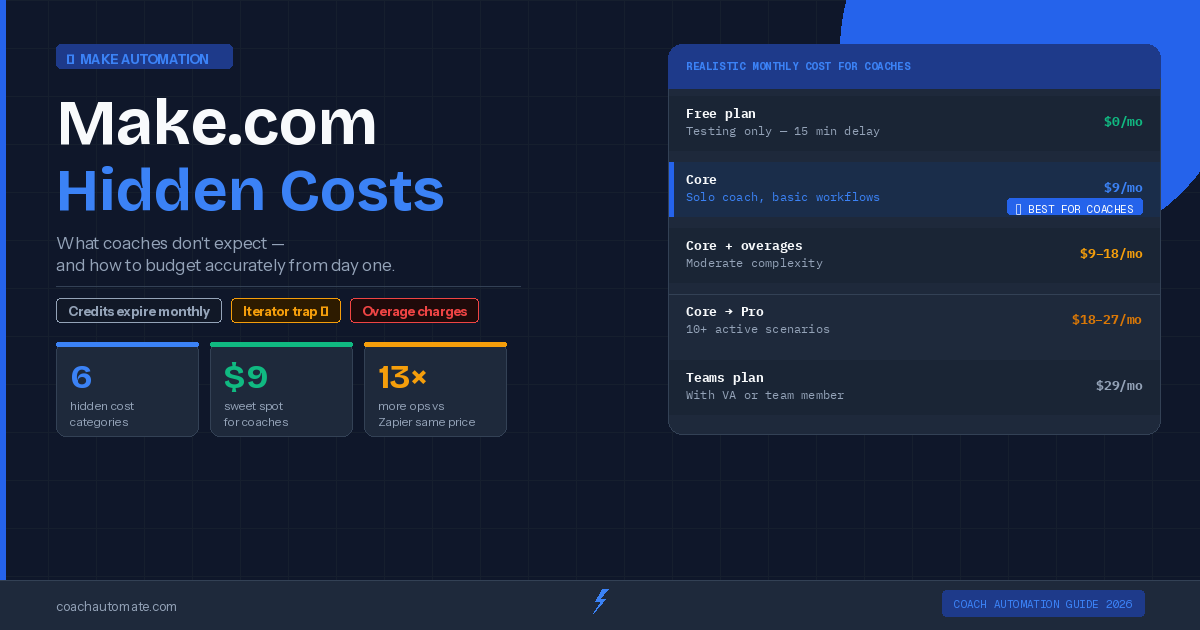
Make.com offers a free tier plus paid plans that scale based on operations, run frequency and premium features. In practice that means small, low-frequency automations can run on the free plan, while booking-heavy or payment-linked systems will likely need a paid tier. I recommend estimating monthly operations from your workflows (triggers × actions × runs) to pick a plan. Compared to Zapier, Make.com is often more cost-effective at scale because its pricing favors complex, multi-step scenarios.
Can I automate payments, bookings and client onboarding with Make.com?
Absolutely. I built examples that trigger onboarding emails after a Stripe payment, create CRM records from SavvyCal bookings, populate Notion or Google Sheets, and schedule follow-ups. Make.com’s native modules for common coaching tools let you chain actions (payment → onboarding → calendar invite → CRM update) without custom code. Error handling and execution logs are available, though I recommend adding retries and notifications since troubleshooting can sometimes be non-intuitive.
Should coaching businesses choose Make.com or Zapier?
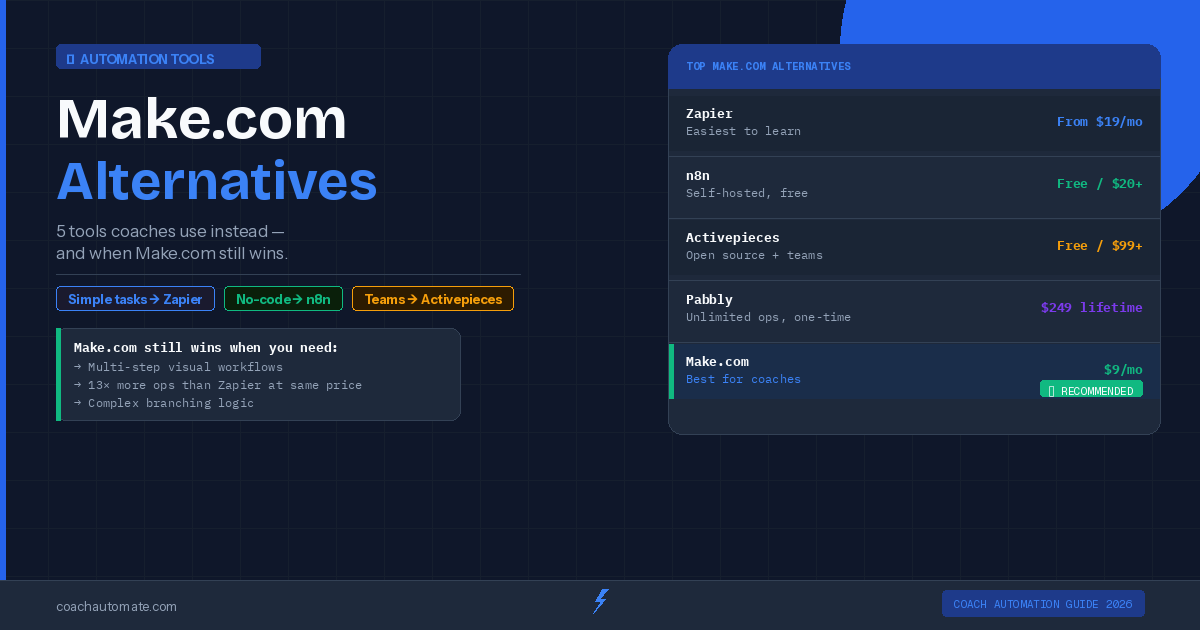
It depends on priorities. From my review, choose Make.com if you need powerful, multi-step automations, native connections to coaching tools, and lower cost at scale. Choose Zapier if you want the fastest, simplest setup and don’t mind higher per-automation costs. Make.com’s drawbacks are a steeper learning curve, confusing operation counts for new users, and occasionally opaque error messages. For most coaches aiming to eliminate admin work long-term, I found Make.com to be the higher-value option.
Get the Coach Automation Playbook — Free
One practical automation tip a week, plus the 32-page playbook as soon as you sign up. No filler, unsubscribe in one click.
✓ Check your inbox — the playbook is on its way!
Something went wrong. Please try again.
No spam. Unsubscribe anytime. We respect your inbox.